Täglich bieten wir KOSTENLOSE lizenzierte Software an, die ihr sonst bezahlen müsstet!
Earbuds Finder Giveaway
$5.99
ABGELAUFEN

iPhone Giveaway of the Day - Earbuds Finder

Find lost Earbuds, headphones, headsets, and other Bluetooth LE devices in no time!
$5.99 ABGELAUFEN

This giveaway offer has been expired. Earbuds Finder is now available on the regular basis.

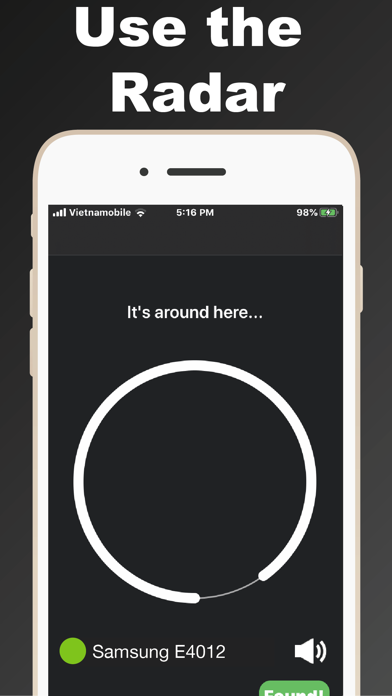
Find lost Earbuds, headphones, headsets, and other Bluetooth LE devices in no time! Use the Bluetooth Scanner + the Sound Alert (see NOTE below) to find one or both of your lost earbuds.
DEVICES that can be found with Earbuds Finder:
 Works with any Headphones using BLE (Bluetooth Low Energy 4.0) and other devices emitting a BLE signal.
BENEFITS
-Find your missing Earbuds, Beats, Powerbeats, Bose, Jaybird, or other BLE devices quickly and stress free!
-Works indoors and outdoors!
-Avoid spending hundreds of dollars replacing your lost Bluetooth headphones/devices
-Use the Bluetooth Scanner + Sound Alert any time you or your friends misplace your earbuds.

-User friendly: Step by step instructions are included. 

Walking slowly while using the app is the key to find your lost Earbuds and BLE devices!

NOTE regarding the Sound Alert Function:
If you wish to use the Bluetooth Scanner + the Sound Alert (using BOTH functions), you must be paired to your missing earbud(s) in iOS Settings. AND: Naturally, you cannot use the Sound Alert with BLE devices that have no speakers;)

SUPPORT: Please contact support (phairinchailert2018@gmail.com) before posting a negative review. Love the app? Please give us a 5 star review! Please don’t hesitate to give us your feedback, we certainly value your opinions!

Entwickler:

Phairin Chailert

Kategorie:

Utilities

Version:

2.0.0

Größe:

24.98 MB

Bewertet:

4+

Sprachen:

English

Kompatibilität:

iPhone, iPad, iPod touch

Kommentare zum Earbuds Finder

Windows Giveaway of the Day
$29.90
free today
PDF-Text OCR Xtractor eignet sich perfekt zum Extrahieren von Text aus PDFs und allen gängigen Bildformaten wie PNG, JPG, BMP und TIFF. PDF Text OCR Xtractor verwendet die Tesseract OCR-Technologie. Tesseract ist vielleicht die leistungsstärkste und fortschrittlichste OCR-Software auf dem Markt, und hier ist der Grund: Zunächst ein bisschen Geschichte. Es wurde 1994 von HP entwickelt, aber bald veröffentlichte das Unternehmen es unter der Apache-Lizenz für die Open-Source-Entwicklung. 2006 übernahm Google das Projekt und sponserte Entwickler für die Arbeit an Tesseract. Heute ist Tesseract die leistungsstärkste OCR-Engine, die Deep Learning verwendet, um Texte aus Bildern (BMP, PNG, JPEG, TIFF usw.) und PDF-Dateien zu extrahieren. PDF Text OCR Xtractor unterstützt mehr als 20 verschiedene Sprachen und ermöglicht es euch, benutzerdefinierte Verarbeitungsparameter für Quelldateien / Bilder festzulegen, z. B. Glätten und DPI-Anpassung, Kontraststeigerung und andere nützliche Tricks, bevor ihr diese analysiert. PDF-Text OCR Xtractor hat eine hohe Genauigkeit und überträgt jedes Bild oder PDF, das ihr habt, in bearbeitbaren durchsuchbaren Text. Die Konvertierung von Bild zu Text erfolgt schnell und problemlos! Haupteigenschaften: 1. Verwendung der besten verfügbaren OCR-Technologie. 2. Unterstützung für mehr als 20 verschiedene Sprachen. 3. Nützliche Bildtransformationen zur Verbesserung der Genauigkeit bei schwierigen Dokumenten. Zusätzliche Funktionen: 1. Günstigste Tesseract Engine grafische Benutzeroberfläche, die ihr finden könnt! 2. Unterstützung für PDF und alle gängigen Bildformate wie PNG, JPG, BMP.