Her gün sizlere, piyasa değeri onlarca dolar olan bir programı tamamen ücretsiz olarak sunuyoruz!

iPhone Giveaway of the Day - PhotoFusion Pro: Photo Editor
PhotoFusion Pro: Photo Editor
sizin için Giveaway of the day farkıyla bedava!
Bu programı indirmek ve kurmak için sınırlı zamanınız var.

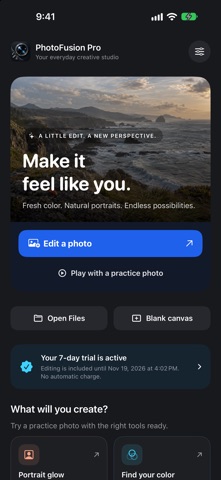
Make your photos feel like you. Explore natural portraits, cinematic color and fresh backgrounds in one creative studio for iPhone and iPad. Try all editing tools free for 7 days, then choose a one-time Pro unlock. No subscription.
FIND YOUR LOOK
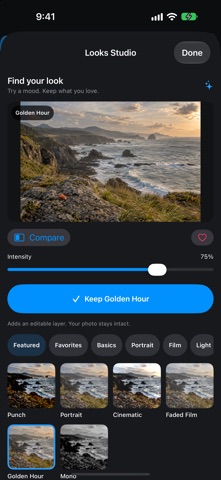
Preview film, portrait, light and black-and-white looks on your photo. Dial the intensity up or down, compare with your current edit, and save favorite looks. Keep a style as an editable adjustment layer so you can change it later.
PORTRAITS WITH PERSONALITY
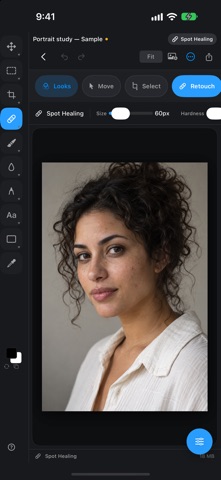
Tune light, color and detail. Use on-device facial analysis for gentle portrait enhancement, review suggested facial spots before retouching, or touch up an area with healing and clone tools. Keep the details that make your subject unique.
A FRESH SETTING
Select your subject, check the edges, then try a solid color, a bundled studio backdrop or a photo you import. Refine the separate subject mask while keeping your original image.
CLEAN UP DISTRACTIONS
Brush over unwanted objects or background people and review the local fill. Use healing, clone, dodge, burn and sharpening for closer control. Local removal works best on simple backgrounds; complex scenes may need manual cleanup.
PLAY, LEARN, CREATE
Start with six AI-generated practice photos, from a coastal scene to portraits, wildlife and still life. Creative shortcuts open a sample with relevant tools ready. Follow the four-step Portrait Studio Challenge through retouching, backgrounds, comparison and export.
KEEP CREATING
Combine photo, text, shape and adjustment layers. Add another photo to an existing project. Save editable work in My Creations, then export a finished image to save or share. Explore masks, blend modes, curves and color controls when you want to go further.
MADE FOR YOUR SCREEN
Work in the compact iPhone layout or spread out on iPad. Use Apple Pencil with compatible iPads. The iPad app is also available on supported Apple silicon Macs.
BEFORE YOU START
The app interface is in English. Core editing works offline. On-device detection uses Apple Vision and depends on the device, OS and image; unsupported actions explain their requirements. Portrait tools do not reshape faces or guarantee automatic blemish removal.
Optional Generative Fill (Cloud) sends the selected image, mask and prompt to a provider you configure. It requires your own compatible API key and may incur separate provider charges. Cloud service credits are not included.
Download free and start a 7-day trial of every editing tool when you confirm the free trial in the App Store. There is no automatic charge or subscription. After 7 days, keep editing with a one-time Pro unlock: $9.99 in the U.S.; the App Store shows your local price before confirmation. Without the unlock, you can still view, export and back up existing projects. Previous paid-app buyers keep full access without buying again. Restore Purchases is available in Settings.
Terms of Use (EULA): https://www.apple.com/legal/internet-services/itunes/dev/stdeula/
Hazırlayan:
Trisphere Apps LLC
Kategori:
Photo & Video
Sürüm:
2.2
Boyut:
30.29 MB
Değerlendirme:
4+
Diller:
English
Uyumluluk:
iPhone, iPad

PhotoFusion Pro: Photo Editor üzerine yorumlar