Chaque jour, nous vous offrons des logiciels sous licence GRATUITS que vous devriez autrement payer!

iPhone Giveaway of the Day - TuLink-Long Screenshot&Collage
TuLink-Long Screenshot&Collage
est disponible comme Giveaway of the day!
You have limited time to download, install and register it.

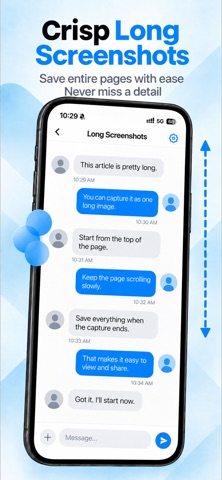
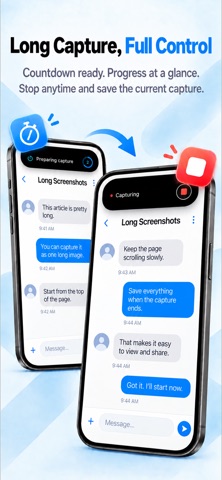
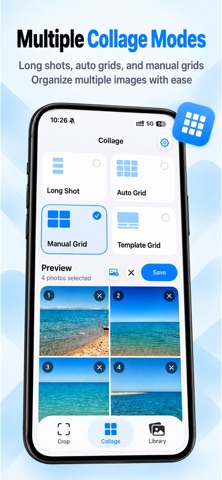
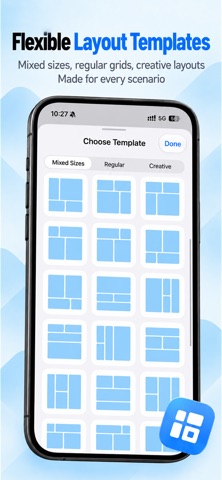
We’re committed to making a long screenshot tool that is convenient, quick to use, and produces high-quality images!
【Long Screenshots】
Available in the free version!
How to use:
1. Add TuLink’s Start Capture control to Control Center.
2. Tap the dedicated Start Capture button you added.
3. Confirm screen recording, then slowly scroll through the page.
4. Touch and hold the Dynamic Island, then tap the stop button to save.
Our Control Center controls include Start Capture, Stop Capture, and a combined Start/Stop button.
You can also try using these controls to trigger capture through:
1. The iPhone side button
2. Shortcuts
3. Other tools that can run Apple shortcuts
Note: You can try and test these methods, but not all are guaranteed to work. Please evaluate them according to your needs.
In addition to long screenshots, TuLink also offers:
【Photo Stitching】
Select multiple images from Photos and combine them into a vertical long image. Adjust their order, visible areas, and spacing to organize screenshots and photos.
【Document Scanning】
Capture multiple document pages in succession or import images from Photos. Adjust corners, correct perspective, enhance images, and export scanned images.
Scans are stored in the app, ready to view, edit, or add more pages.
【Photo Editing】
Open images saved in TuLink for basic editing, color adjustments, and filters.
Use undo, redo, and original-image comparison to fine-tune the result.
We also offer additional tools with Pro:
【Pro Features】
Grid and template collages, text recognition and export, PDF preview and export, importing photos for editing, text, watermarks, drawing, mosaic effects, phone frames, and custom screenshot watermarks require paid Pro access.
Pro offers monthly and yearly auto-renewable subscriptions and a one-time lifetime purchase. Prices are shown on the purchase page. Manage subscriptions in your Apple Account subscription settings. To prevent renewal, cancel at least 24 hours before the current period ends. Access continues through the paid period after cancellation. Lifetime purchases do not renew automatically. Eligible purchases can be restored using Restore Purchases.
【Privacy and On-Device Processing】
Screenshot stitching, photo editing, document scanning, and text recognition are processed locally on your iPhone. Image and document content is not uploaded for cloud processing.
No account registration is required. Both the free version and Pro are ad-free. We do not use behavioral tracking to analyze your image content.
The camera is used only for scanning. Photo imports access only the images you select. Saving to Photos requires your permission. Please review recognition and processing results before use.
【System Requirements】
Requires an iPhone running iOS 27 or later. Dynamic Island controls require a supported iPhone model.
Terms of Use (Apple Standard EULA):
https://www.apple.com/legal/internet-services/itunes/dev/stdeula/
Dévelopeur:
鑫 刘
Catégorie:
Photo & Video
Version:
1.0.7
Taille:
36.51 MB
Noté:
4+
Langues:
Arabic, Catalan, Croatian, Czech, Danish, Dutch, English, Finnish, French, German, Greek, Hebrew, Italian, Japanese, Korean, Malay, Bokmål, Polish, Portuguese, Chinese, Slovak, Spanish, Swedish, Thai, Chinese, Turkish, Vietnamese
Compatibilité:
iPhone, iPad

Commentaires sur TuLink-Long Screenshot&Collage